How to Read J-Books: A Field Guide to Department of War Budget Justification Books

Many of us learned the art of reading from Mortimer J. Adler’s classic How to Read a Book. Unfortunately for folks in the DIB, Mr. Adler did not address J-Books specifically. Yet, they present a wealth of useful intelligence that can guide your business strategy and outlook, if you know how to read them effectively.
In this guide, we break down J-Books, why they’re important, and how to derive intelligence from them in Belisar.
Table of Contents
Timing: J-Books, Authorizations, Appropriations
The Breakdown: J-Books Navigator
What are DoD budget J-Books?
J-Books, or budget justification books, are the detailed documents the Department of War (DoW, or DoD) sends to Congress with each annual budget request. They break the budget request down by program element and line item, explain what each dollar buys, and show proposed funding for the next five years, often well before a solicitation exists.
Other federal departments and civilian agencies (such as OPM, Treasury, HHS, and the EPA) submit budget justifications to congress, as well, though the term “J-Books” typically refers to the defense budget.
The FY2027 request, released April 3, 2026, came in at $1.5 trillion, with $350 billion of it expected through mandatory request spending (Breaking Defense). While that's a staggering number that shows the level of investment in the DoW, it doesn't tell you much about where that budget is directed. But the J-Books do.
Understand the J-Books, and you can see which programs are growing, which are being cut, who is already under contract, and when a program plans to move from prototype to production.
Timing: J-Books precede budget authorizations and appropriations.
For those selling into the government, that represents an early signal of what’s being prioritized or de-prioritized in the coming months and fiscal year. J-Books are released shortly after the President's budget. For FY2027, the topline came in early April 2026 and the detailed books followed later (Breaking Defense). Congress uses the J-Books as their baseline for writing each fiscal year’s budget appropriations.
A J-book line is a request, and the money doesn’t move until Congress has passed two separate laws: an authorization and an appropriation. The authorization says what the DoW may do. The appropriation says how much it can actually spend. If you read a J-book without tracking both, you can misjudge where the money ends up.
Budget authorizations establish (or adjust) authorized funding levels, programs, and policies for the upcoming fiscal year. An authorization increase does not itself provide discretionary budget authority. Congress also does not edit the future-years projections; those are only provided in the J-Books.
Budget appropriations are the laws Congress passes to give federal agencies the legal authority to spend money from the Treasury for specific purposes, in specific amounts, during a given fiscal year. (In some cases, the funds are available for multiple years — depending on the color of money).
The House and Senate Appropriations Committees are split into 12 subcommittees, each of which writes one of the 12 regular appropriations bills. Defense, Homeland Security, and National Security/Department of State are a few of those subcommittees with designated appropriations bills. Congressional appropriations decisions and enacted legislation determine the actual funding available, subject to further execution decisions and restrictions.
Color of money refers to the fact that each appropriation is allocated to a specific purpose and time period specified by Congress. Each J-book volume lines up with a color of money, which is why you’ll find separate RDT&E, Procurement, O&M, MilPers, and MILCON books, with different exhibit formats. Think of appropriations as specific accounts within a given color of money.
Where to find J-Books
The Office of the Under Secretary (Comptroller) publishes every J-Book on its budget materials site. Each fiscal year has its own page, with justification books grouped by appropriation, and then by service or agency.
Start with the summary documents to get a bird's eye view of the field, then go deep:
- R-1 lists every RDT&E program element and its request. (FY2027 R-1)
- P-1 lists every procurement line item. (FY2027 P-1).
- O-1 covers operation and maintenance (FY2027 O-1) and lists every sub-activity group.
- The Service and Agency J-Books carry the detailed exhibits that support each budget line (e.g., the OSD procurement book, SOCOM OP-5 book, or the DLA RDT&E book).
Army, Navy and Air Force books are also posted on each Service's financial management site. A single Service's RDT&E submission can run to several volumes and thousands of pages.
How J-Books are organized
J-Books share a primary structure, but the details and labels can vary depending on the color of money. However, every color of money breaks down from the full appropriation account, with increasing detail down to the justification for each line item.
1. Account: Which pot of money it comes from.
Appropriations are essentially the treasury accounts within a color of money, and they are written into law by Congress, along with rules for what the money can buy, and how long it stays available. Note that each service may have several accounts: The Air Force, for example, delineates Air Force, Air Force Reserves, Air National Guard, and Space Force.
2. Budget Activity: What the money is for.
Each account is divided into a handful of broad purposes. In O&M, that’s Operating Forces, Mobilization, Training and Recruiting, and Administration. In RDT&E, it’s the stages of development, from Basic Research through Operational Systems Development.
3. Presentation/Grouping Band: Related efforts clustered together.
Some colors add a middle layer here. O&M groups its work into Activity Groups such as Air Operations or Ship Operations. Procurement uses Budget Sub-Activities. Other colors skip this layer altogether.
4. Budget Line Item: Specific program funding lines.
These are the budget funding lines Congress adds to, cuts, and tracks: a SAG in O&M, a P-1 line in Procurement, a Program Element in RDT&E, a project in MILCON. If you’re tracking a program’s funding, this is the line to watch. It’s also where most changes are made when the committees mark up the budget.
5. Sub-Line Detail: The justification for the spend.
This is the Service’s argument for the money: Quantities and unit costs, schedules, accomplishments and planned work, and cost breakdowns. It’s where you find out what the program is buying, when, and from whom.
6. Cost Breakdown (by input).
The most detailed level in the justification exhibits. This splits a budget line by what the money buys rather than by purpose, so it often shows what is likely to be purchased. How specific it gets depends on the appropriation type. RDT&E’s R-3 contract cost lines are the most specific: they name each effort’s contract method and type, performer (often the incumbent), cost and award dates. O&M’s object classes are far broader, and MilPers level 6 outlines pay rather than purchases.
Think of it as a mailing address.
Country, state, city, street, house. Every address uses that format, even when the street names change. Some addresses might contain a suite number or building floor, whereas others don’t. J-books work the same way. Each color of money follows the same five tiers, but the labels and details may vary:
- O&M uses Activity Groups and SAGs.
- Procurement uses Budget Sub-Activities and P-1 lines.
- MILCON is an exception, because it’s organized by where the money goes rather than what it’s for.
Once you know the format, you can find the line that matters in any color of money.
The Breakdown: J-Books Navigator
Use our J-Books Navigator to break down the various J-Books structures by color of money.
View the full-size version here.
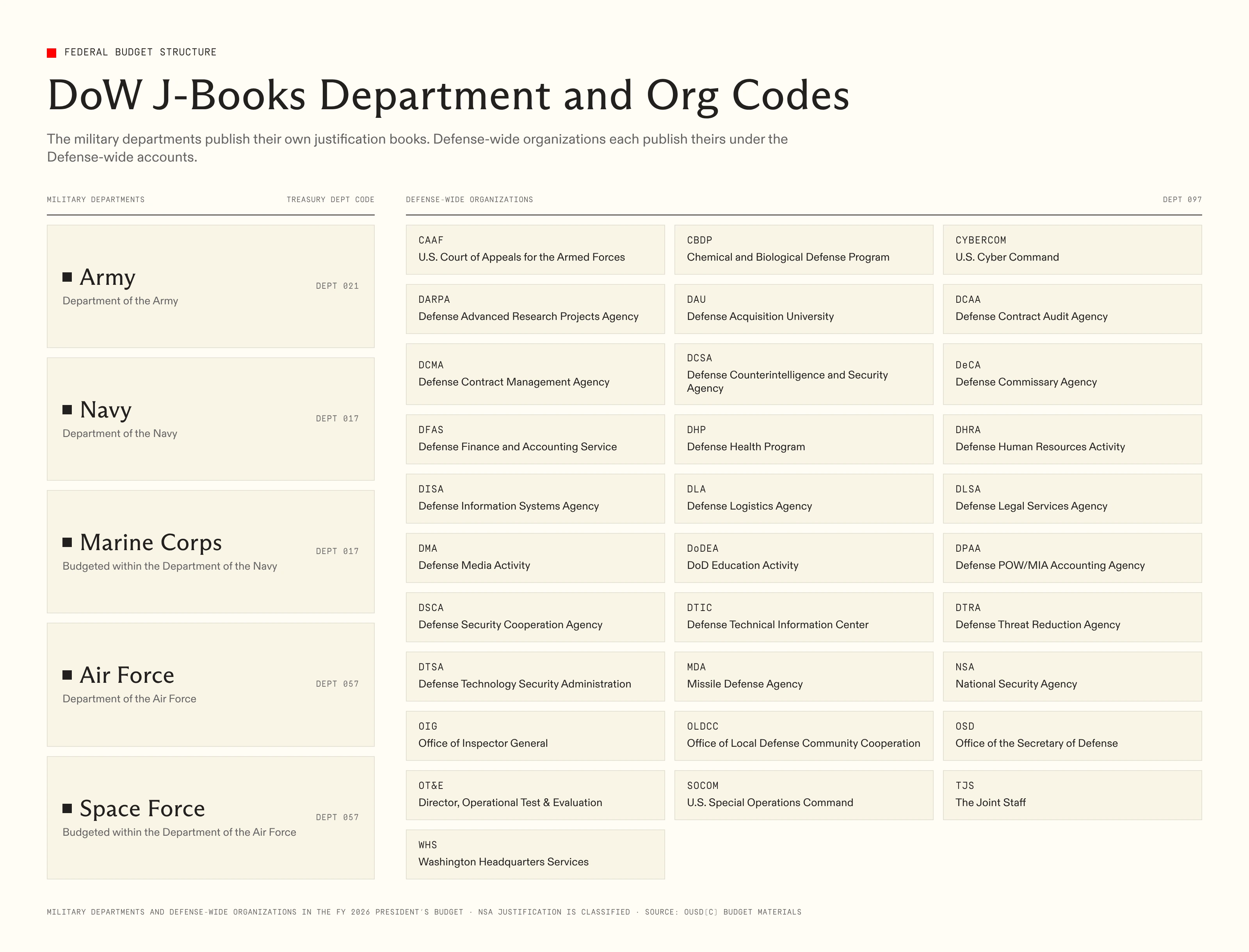
Because J-Books are created by many defense organizations, it can also be helpful for defense contractors to understand the organization and treasury department codes. See below for a J-Books Department Codes Summary.
How to Read a J-Book, in 5 steps
You don't read a J-Book cover to cover. You find your lines, then read the exhibits that answer four questions: what is being bought, how much, from whom, and when. (If you want to skip reading J-Books directly, scroll down to the part where we show you how Belisar makes J-Books searchable).
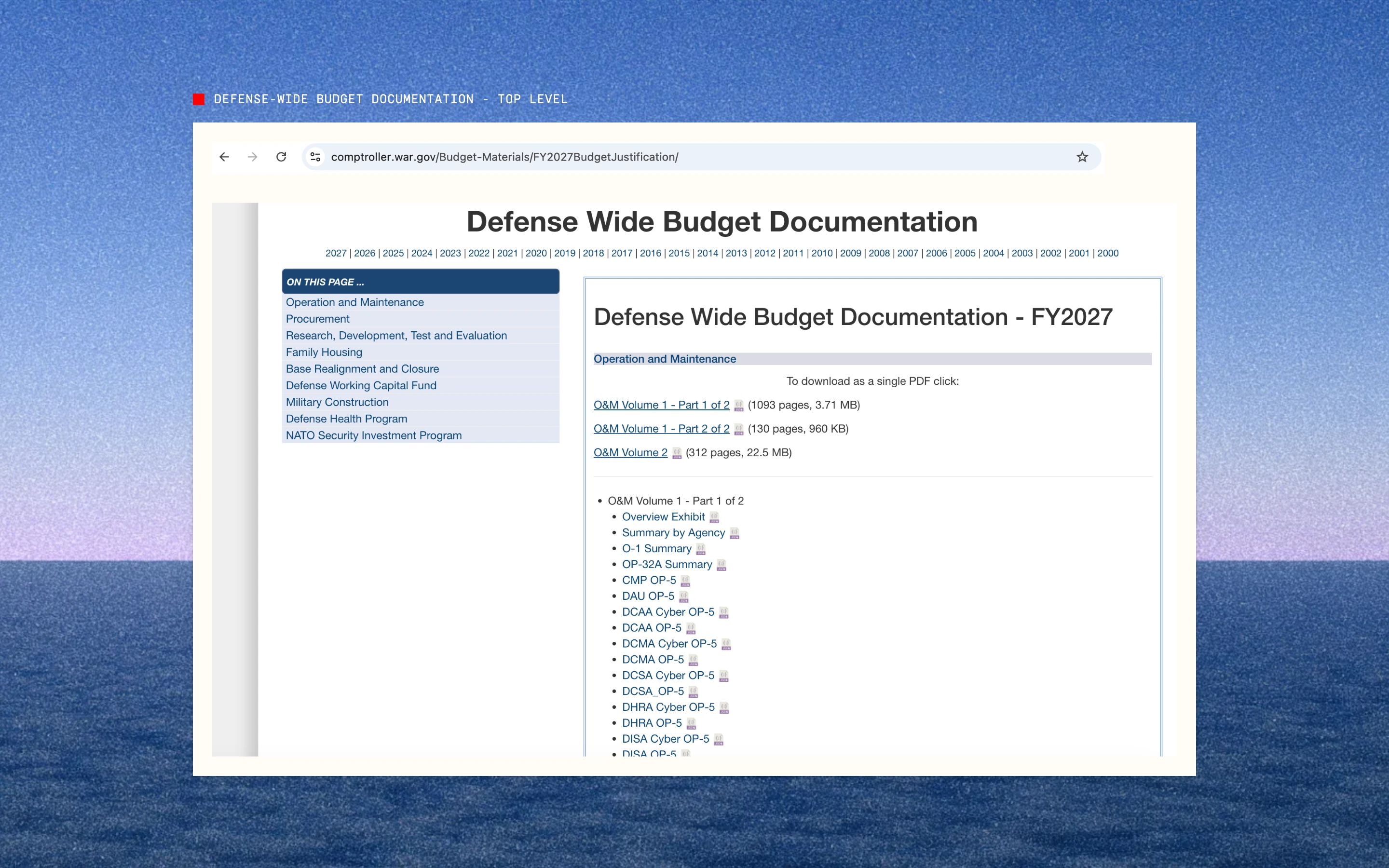
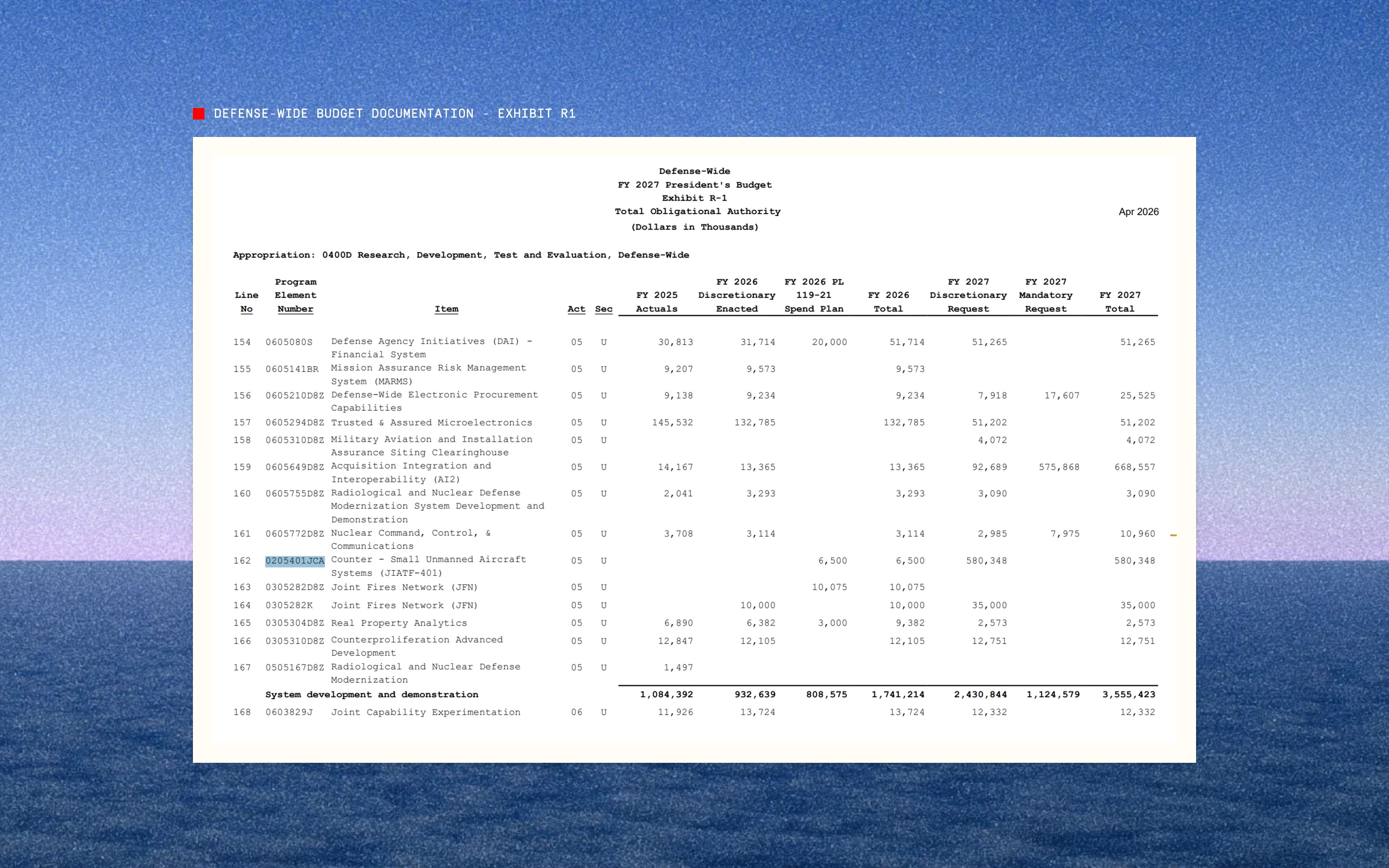
In these screenshots, we’ll drill down to see the detail of a sample program element focused on counter-small unmanned aircraft systems, or C-sUAS.
1. Find your lines in the R-1, O-1, or P-1.
Search by technology, mission area or a known program name. Note the program element or line item number; it is your key into everything else.
2. Read the R-2 or P-40 narrative.
The R-2 gives the summary funding, mission description and justification for a program element. The P-40 does the same for a procurement line. Look for "planned programs" language: it describes what the money will do next year.
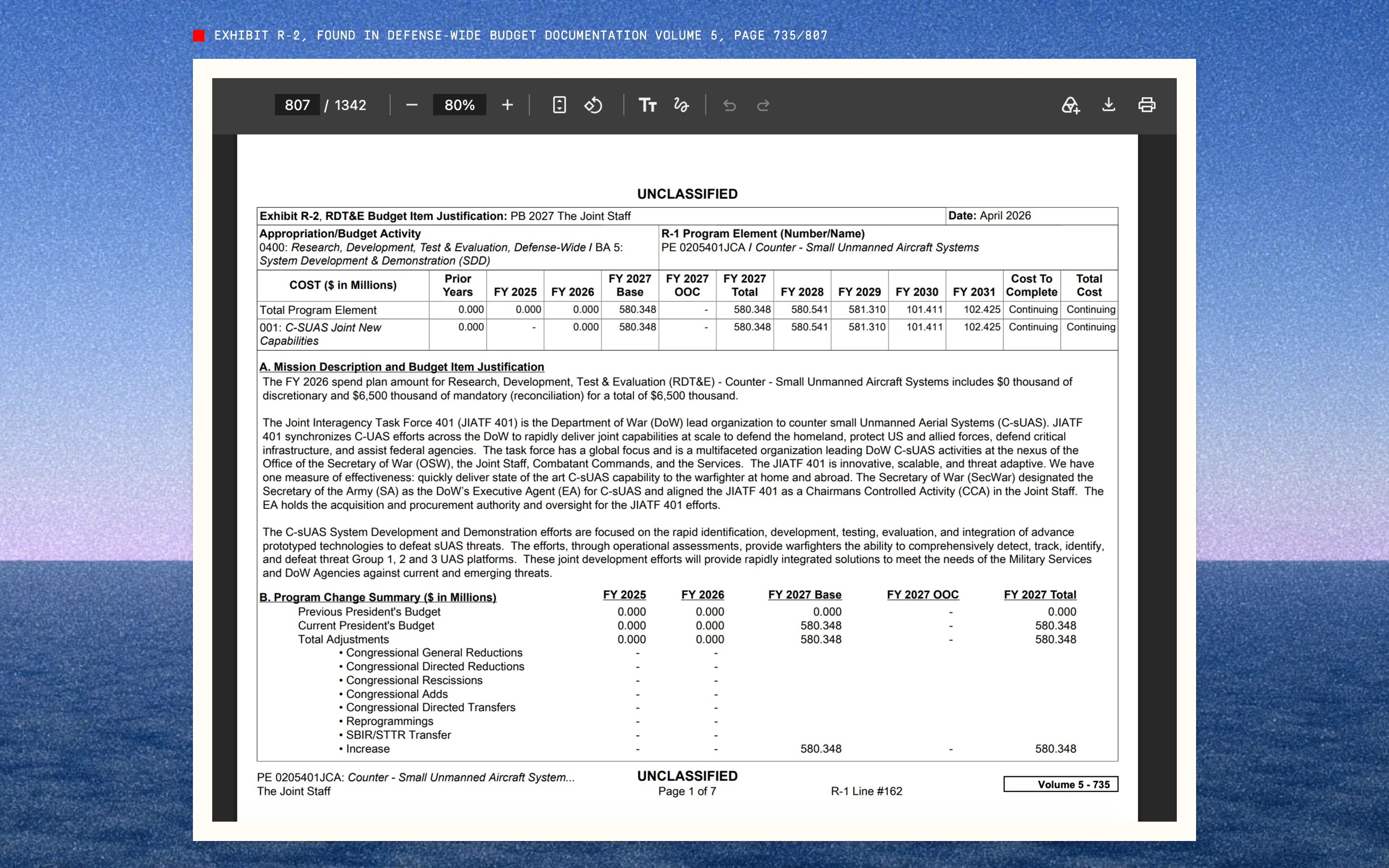
3. Follow the money across years.
Each exhibit shows prior, current and budget year funding, plus the outyears for RDT&E and Procurement. A sharp jump usually marks a transition, such as prototype to development or RDT&E to procurement. A drop to zero can mean a program is ending, moving, or restructured. It’s also possible that the budget has been transferred elsewhere, or that the program was intended to fill a one-time requirement.
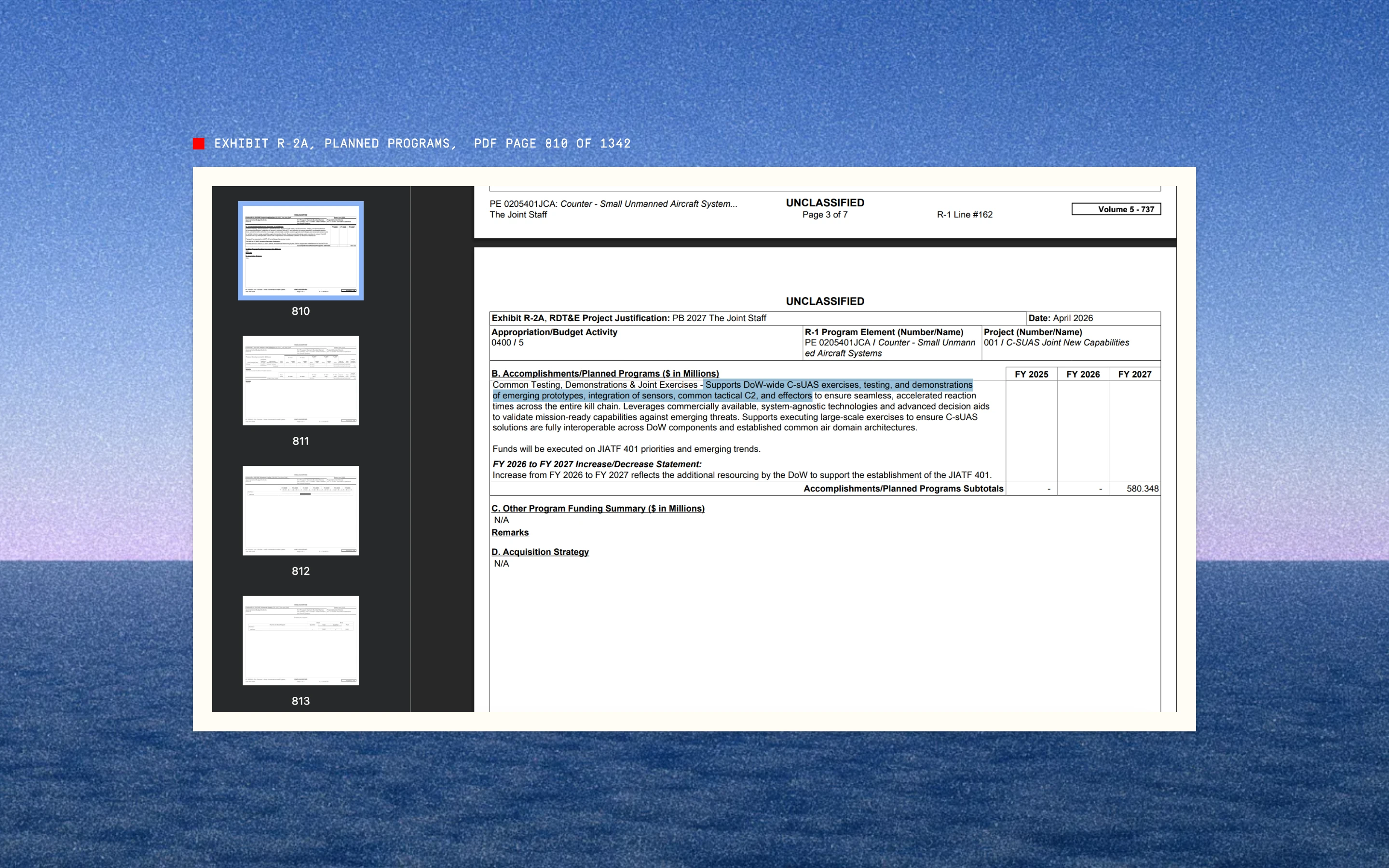
4. Open the detail exhibits.
These give additional detail. In RDT&E, R-2A breaks a program element into projects. The R-3 shows cost detail and performing activities. The R-4 and R-4A lay out milestones. In procurement, the P-5 breaks down cost and the P-5a lists contractors, contract types and award dates.
5. Read the change summary.
Compare this year's request against last year's. Then check what Congress did to it in the authorization and appropriations marks. A plus-up or cut there changes the real number you are chasing.
The output is a short list of the program, the funding window, the incumbent, and the next milestone. And that’s where a capture plan can begin.
How not to read J-Books
Most teams that give up on J-Books make one of these mistakes.
- Treating the request as the codified budget. The request is the Department's ask. Congress changes it, sometimes by a lot. Be sure to track the enacted number, not just the request.
- Stopping at the program element. Don’t make assumptions or dismiss programs because of the PE total; it can hide a growing project inside a line that looks like it’s shrinking. The R-2A contains meaningful details you won’t want to skip over.
- Ignoring the outyears. Outyear funding is just a plan, but where it is available, it can help you flag a planned ramp two years out. And that allows you to start shaping requirements early.
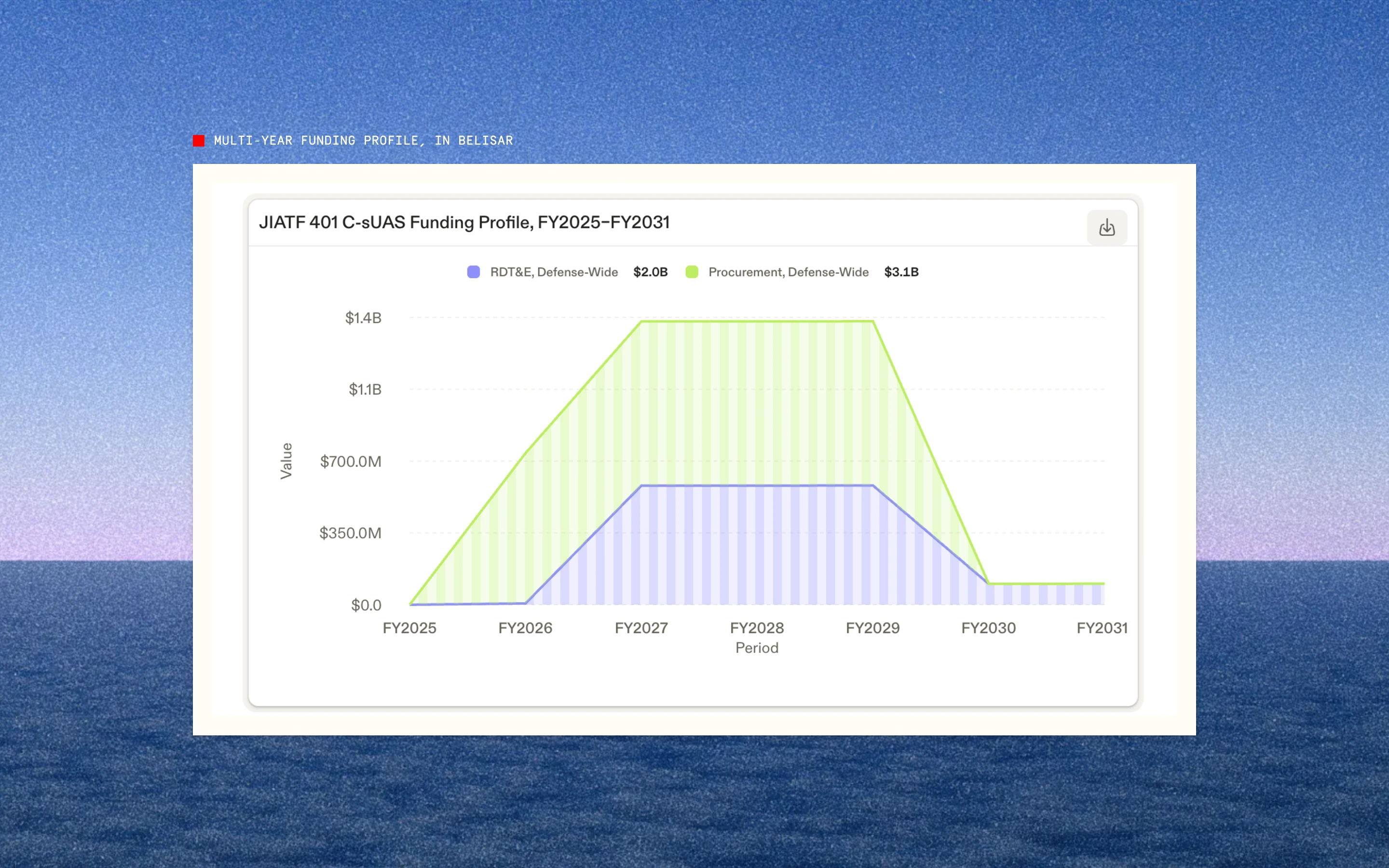
- Searching just one term. In the C-sUAS examples above, searching the R1 PDF by the term “C-sUAS” did not return this highly relevant program element. That’s because, in that document, it was spelled out, without the abbreviation. However, other program elements did include the abbreviation. So, when you’re manually searching through the J-Books, you’ll want to make sure you cover your bases with search terms to ensure you don’t miss anything important.
- Reading one year, or one program, in isolation. It's easy to misinterpret a line if you aren't comparing it against last year's book. Renamed or merged program elements are also easy to lose without a side-by-side comparison. It’s also important to assess programs in aggregate to better understand broader trends across agencies.
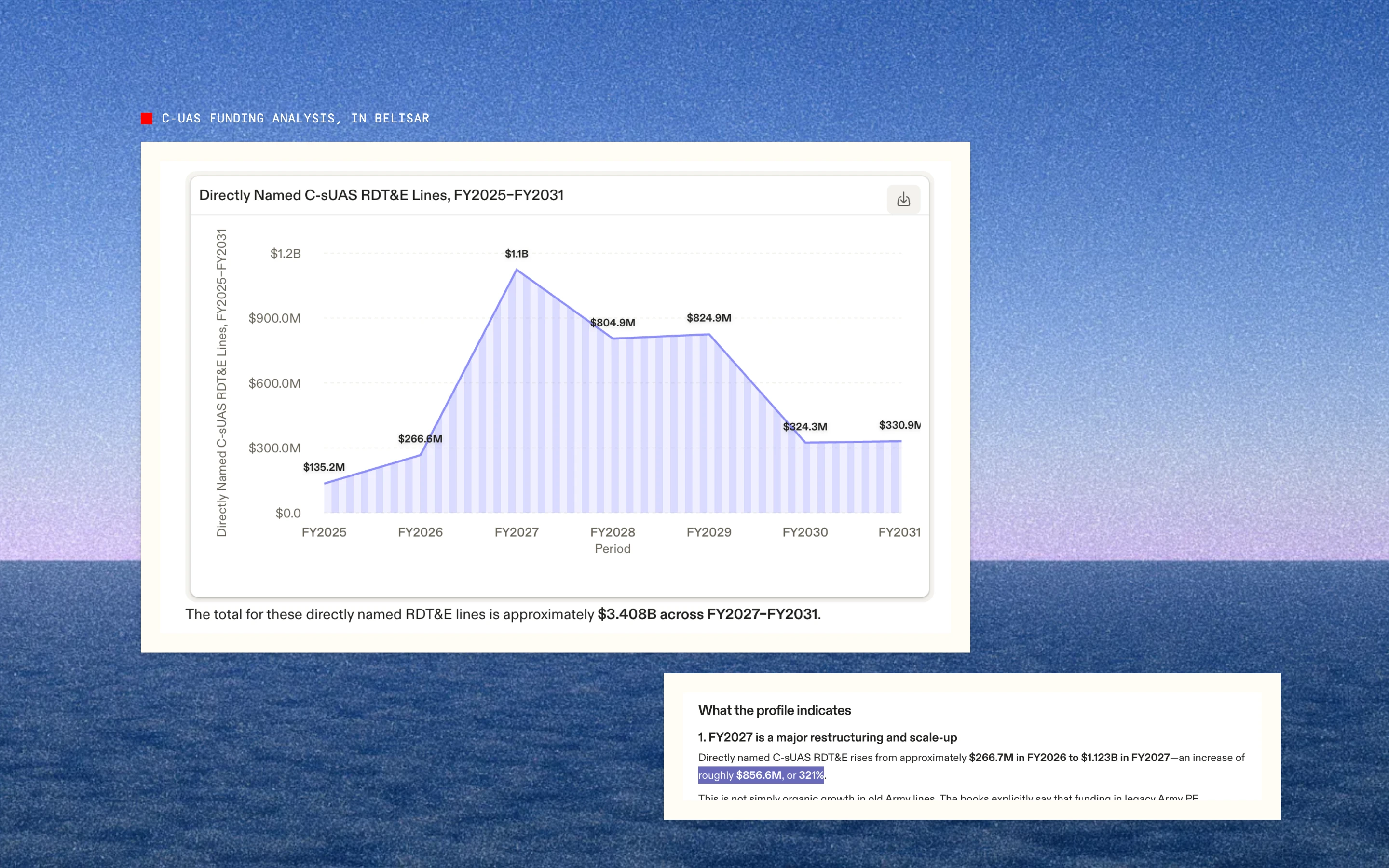
- Doing it once. J-Books publish every year, and programs move every year. A one-time read goes stale after appropriations bills are passed and the next budget cycle starts. While J-Books provide signals of what’s ahead, you need to combine that data with subsequent legislation and program activity to keep a clear picture of how programs are unfolding.
J-Books reward those who track lines over time and connect them to contracts, people and pipelines. That is hard to do in PDFs and spreadsheets, which is why a tool like Belisar is so valuable in helping you see the long game with the appropriate context, without sifting through hundreds of dense pages.
How to Make J-Books Easier
Belisar brings important signals and relevant opportunities directly to you
J-Books are the earliest public signal of where Department of War money is headed. The teams that win treat J-books data as a live source of intelligence, but admittedly, staying up to date on J-Books in their standard form is time- and resource-intensive.
Instead, you can use Belisar. Belisar tracks J-Books down to the sub-line and connects each one to government organizations, competitors and your own CRM pipeline, so your team sees a program forming without poring over thousands of pages.
Here’s how you do it:
1. Define your capabilities.
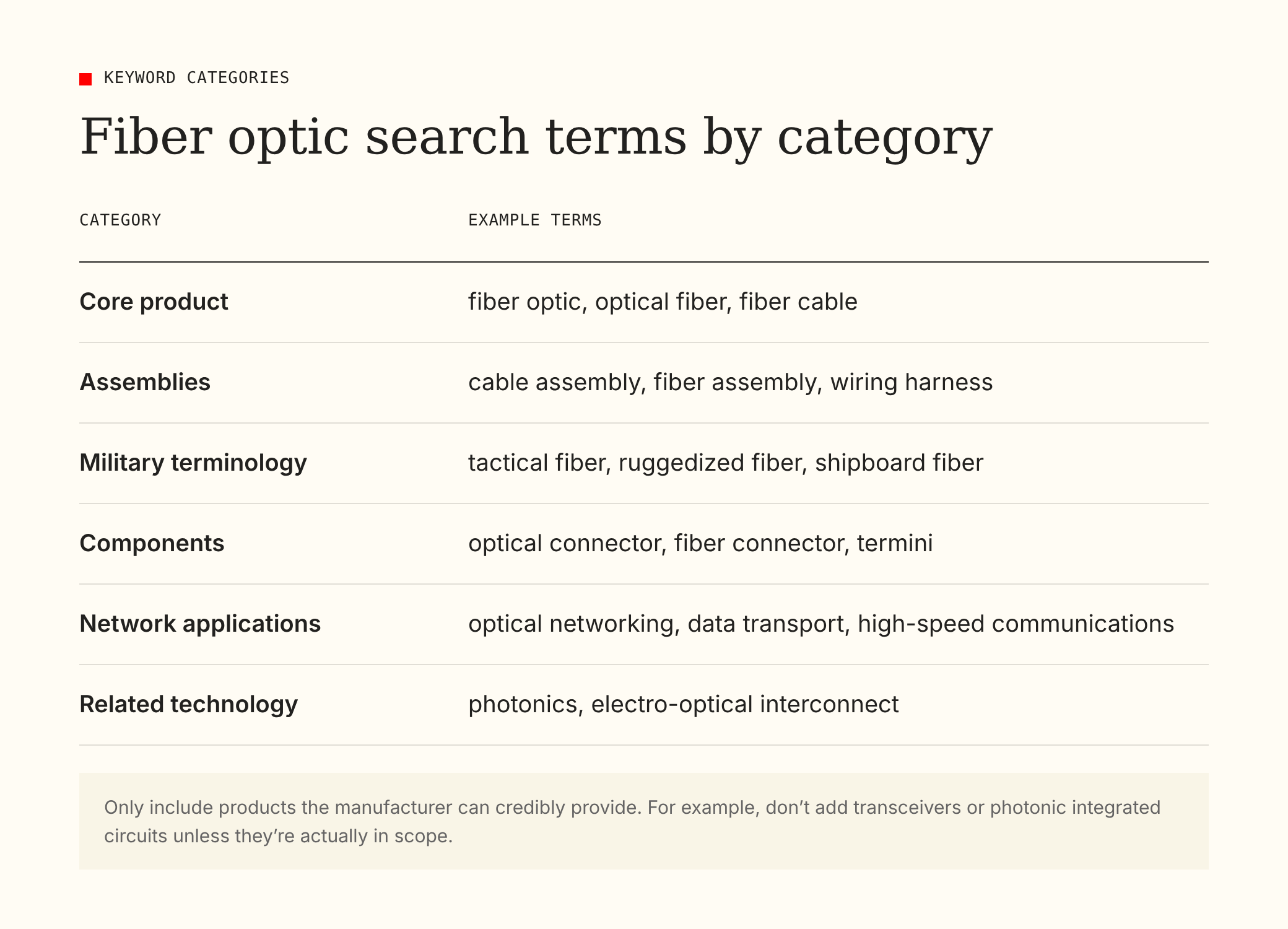
Tell Belisar what your company specializes in. Here’s an example of key terms for a fiber optic cable manufacturer. Be as specific as possible about what you do, and what you don’t do.
2. Run a broad J-Books search in Belisar.
Start with a broad boolean search for some of the terms you identified in step one. Or, ask Belisar to build one for you using the Chat feature on any page.
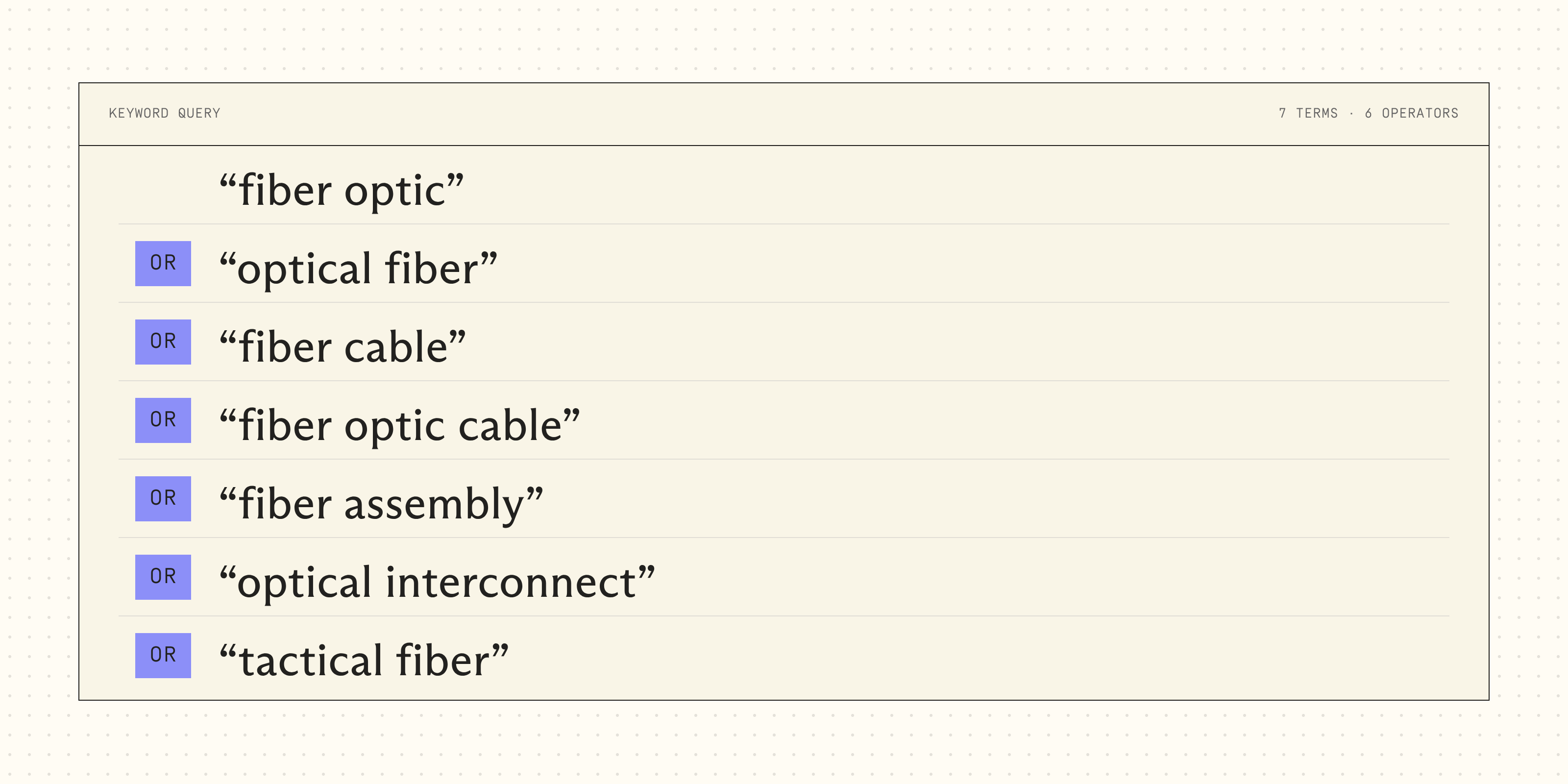
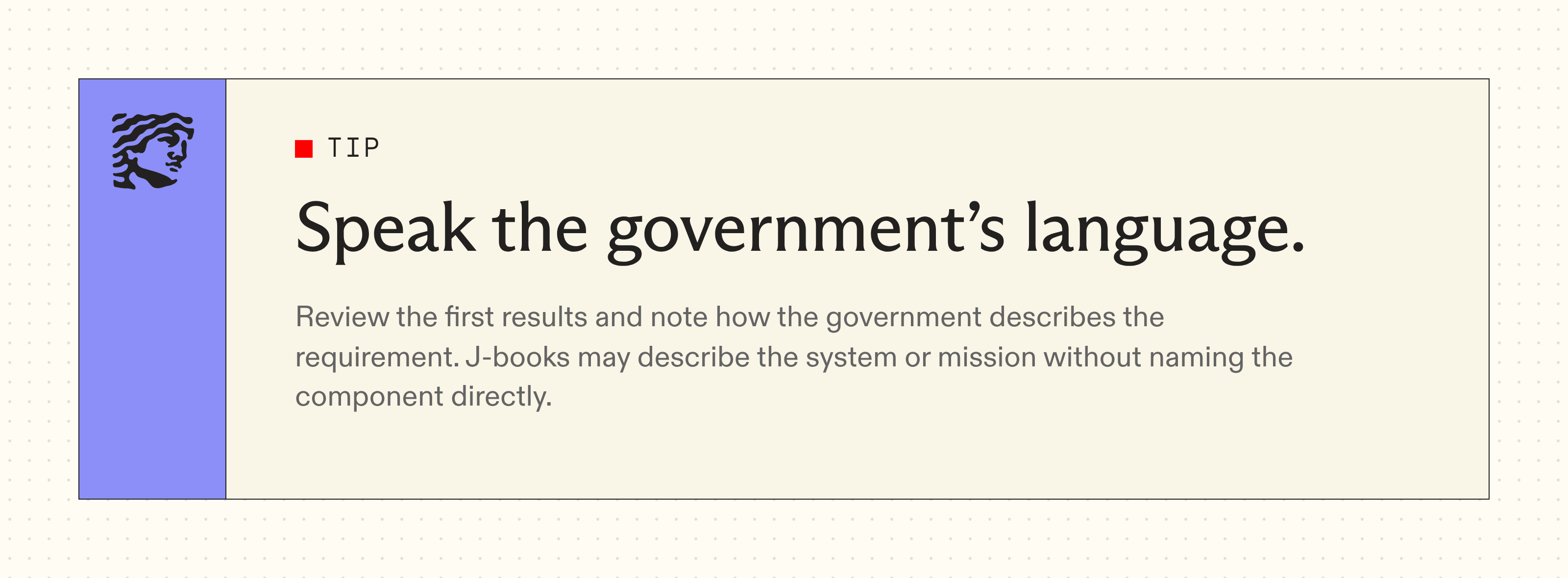
Start your search at the Program Element or Project levels. (Program Element identifies the funded program and its overall mission, whereas Project often provides better detail about the specific equipment or development effort.)
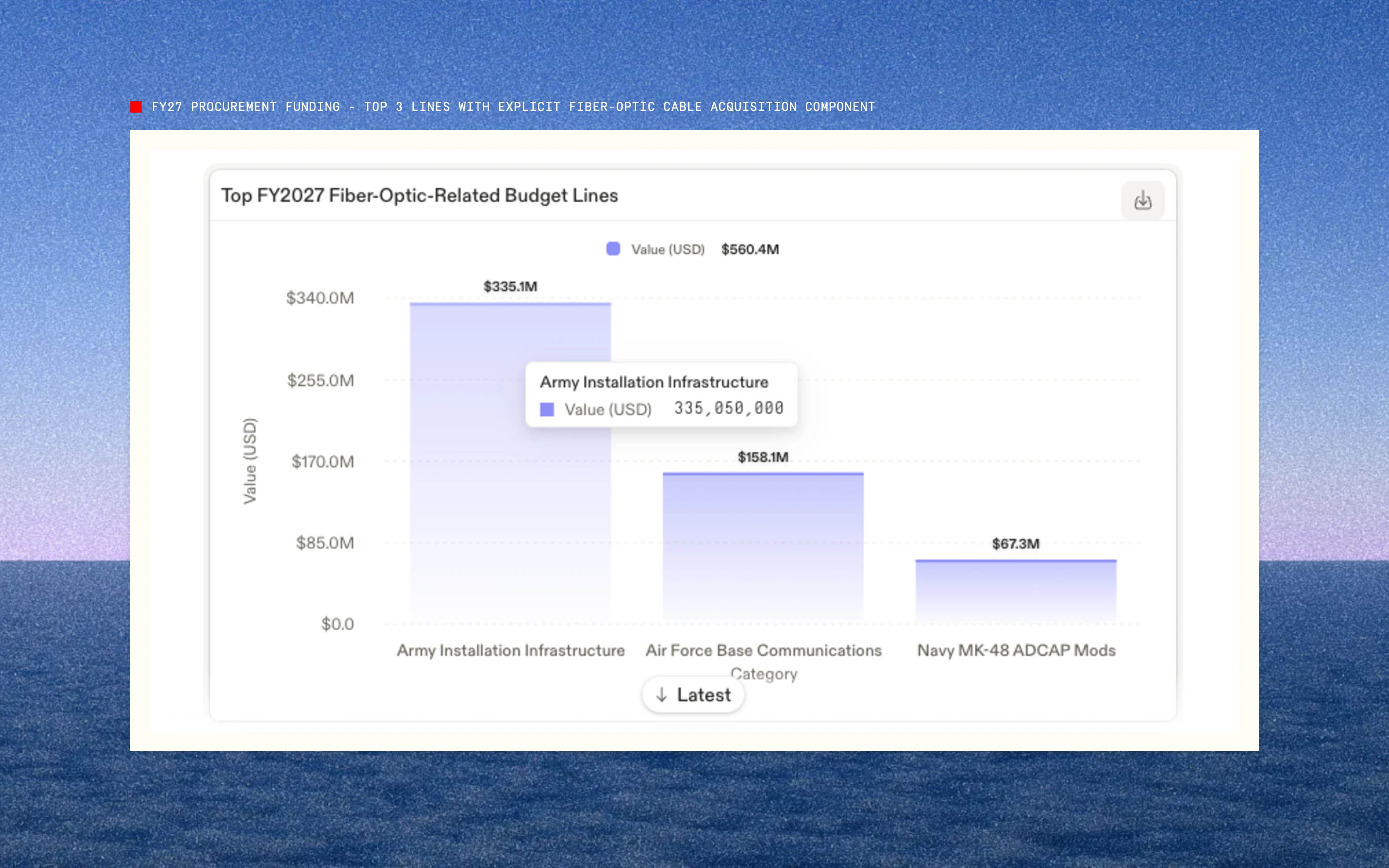
3. Refine using budget-specific filters, if needed.
For example, if you want to explore early signals, you can filter results to “RDT&E” color of money to get a sense of emerging trends. Alternatively, if you are ready to deliver fully developed technology in production, choose the “Procurement” color of money. Other filters include fiscal year, funding amount, and acquisition owner.
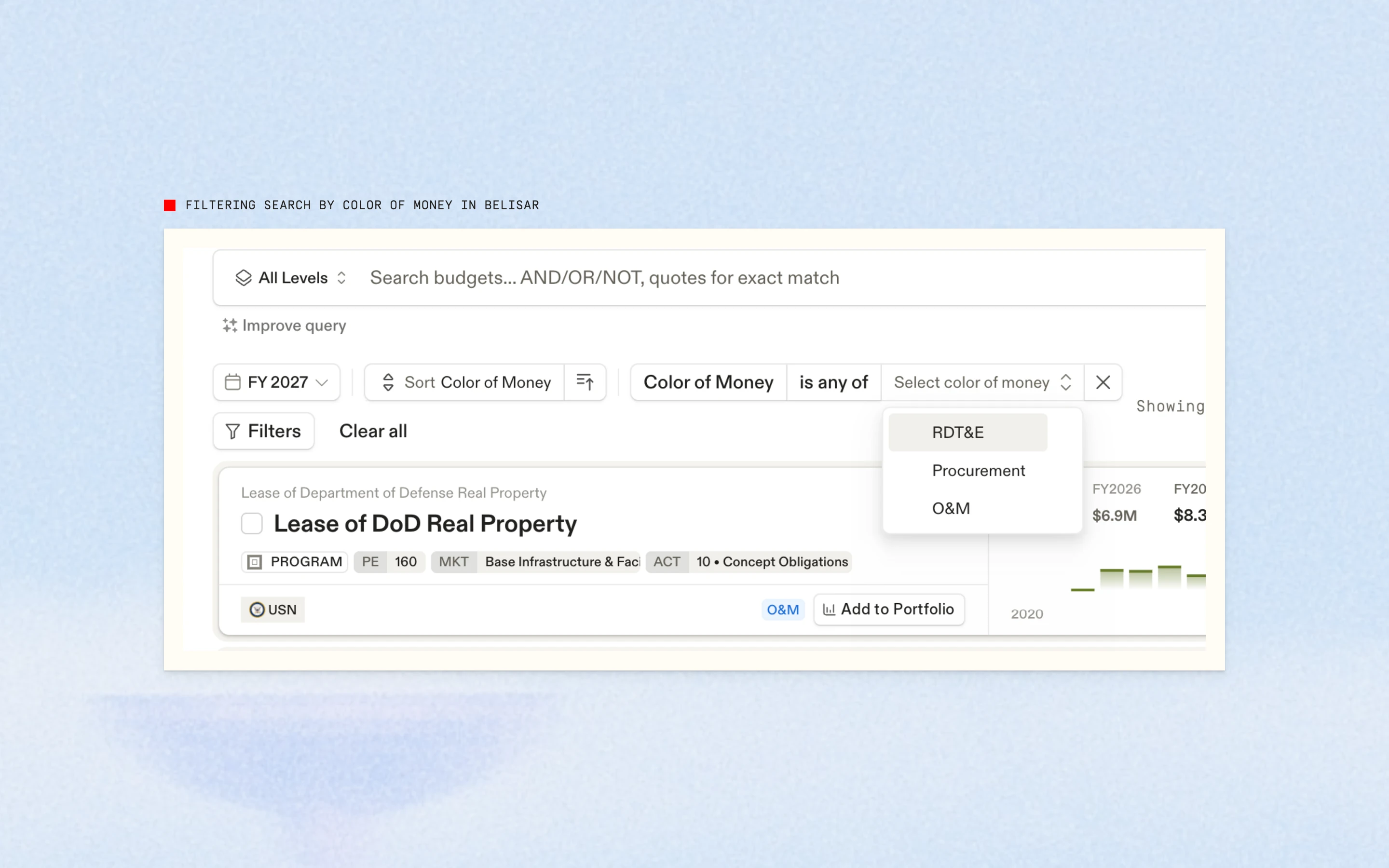
4. Inspect relevant program elements and projects.
What does the data tell you about your best chance of success? What does this mean for your business? You can repeat the previous steps as many times as you like to get to a view that makes sense for any given line of business, or simply ask Belisar to refine via chat, based on your initial impressions of the results. You can add any opportunity of interest to your own pipeline in the CRM.
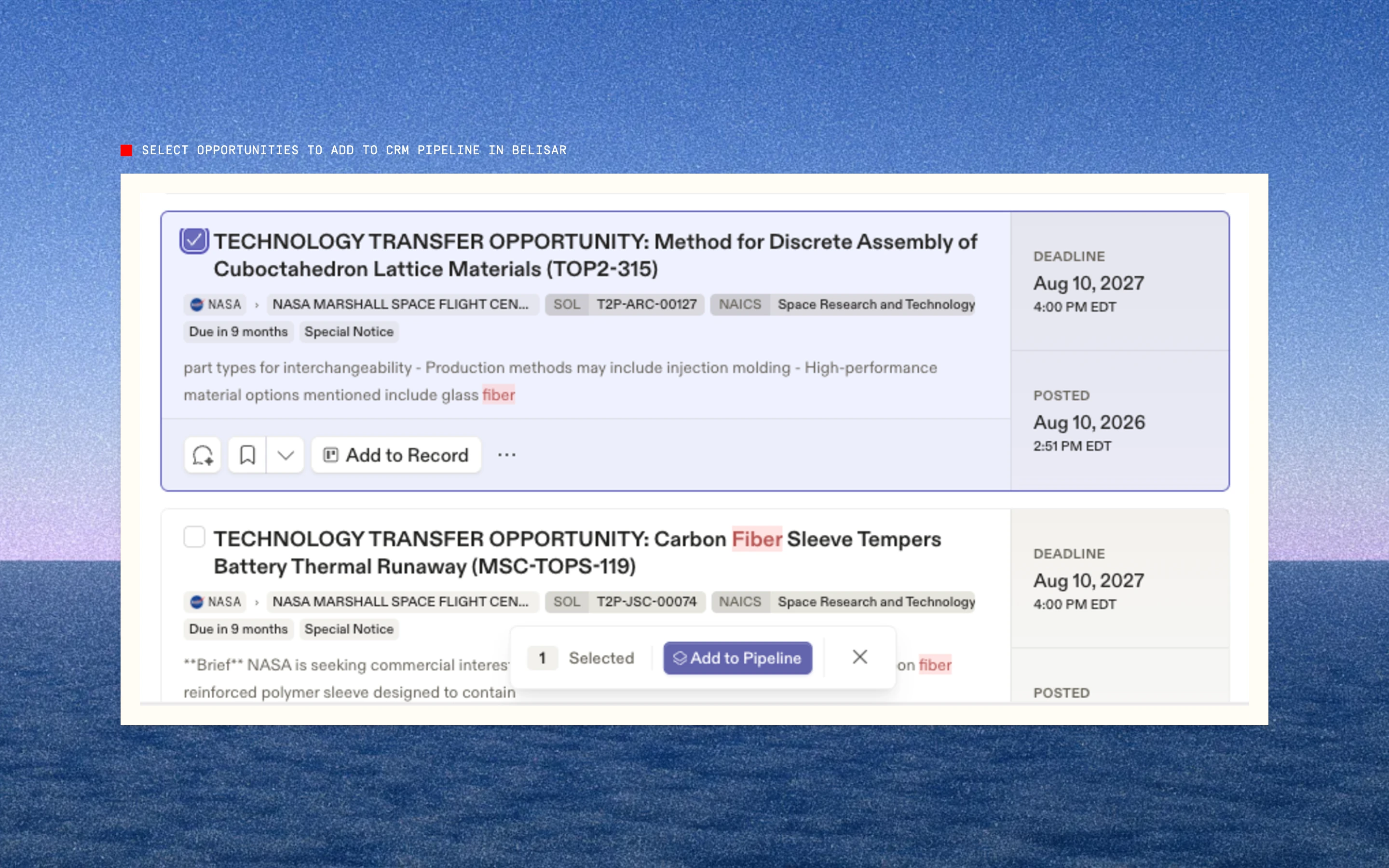
5. Convert the successful search logic into proactive business intelligence.
Once the search is producing results that are relevant to your business, you can put Belisar to work for you in a few ways.
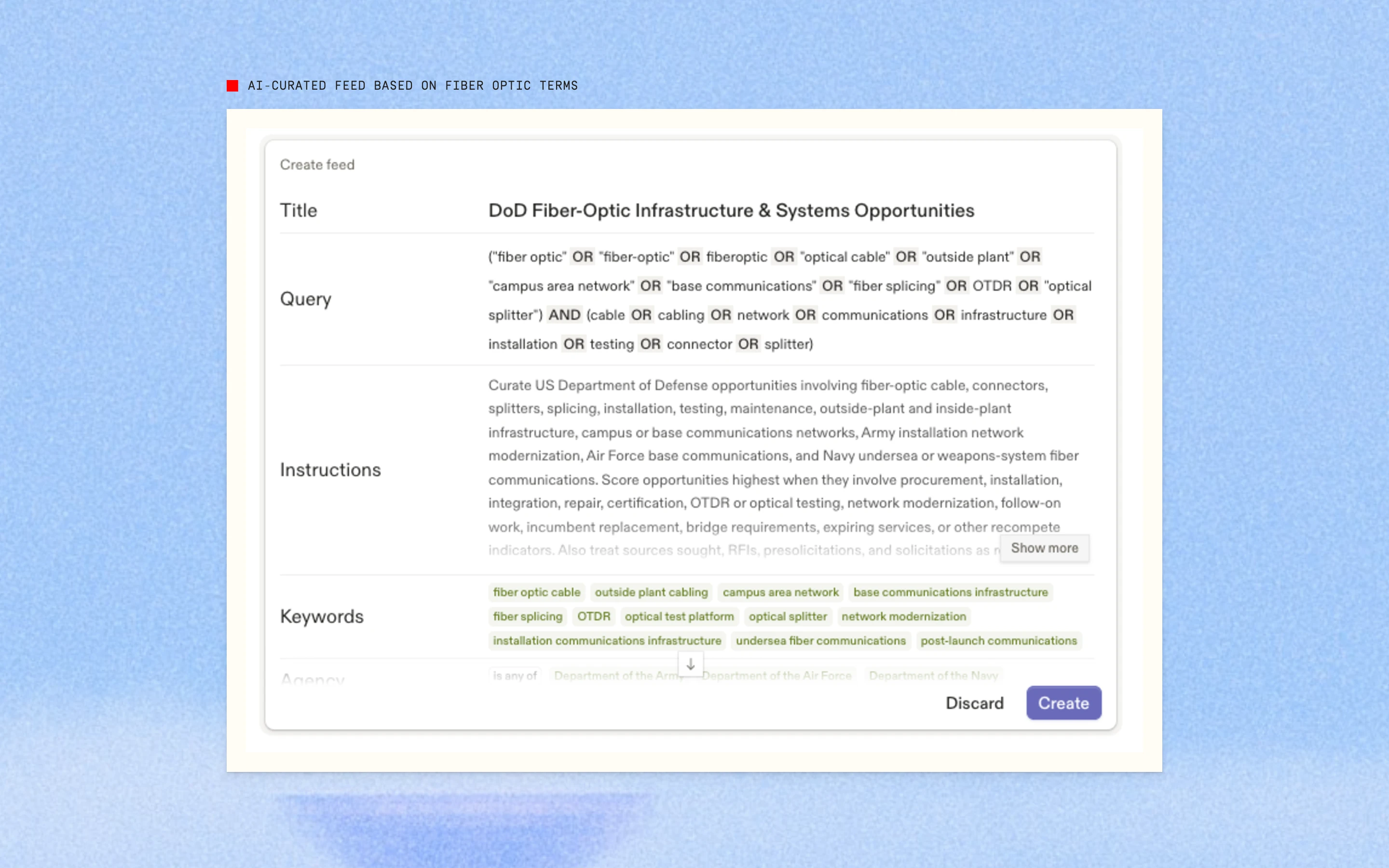
Create an AI-curated opportunity feed.
Turn an opportunity search into an AI-curated feed. Use a descriptive name, such as: Military Fiber-Optic Cable Opportunities.
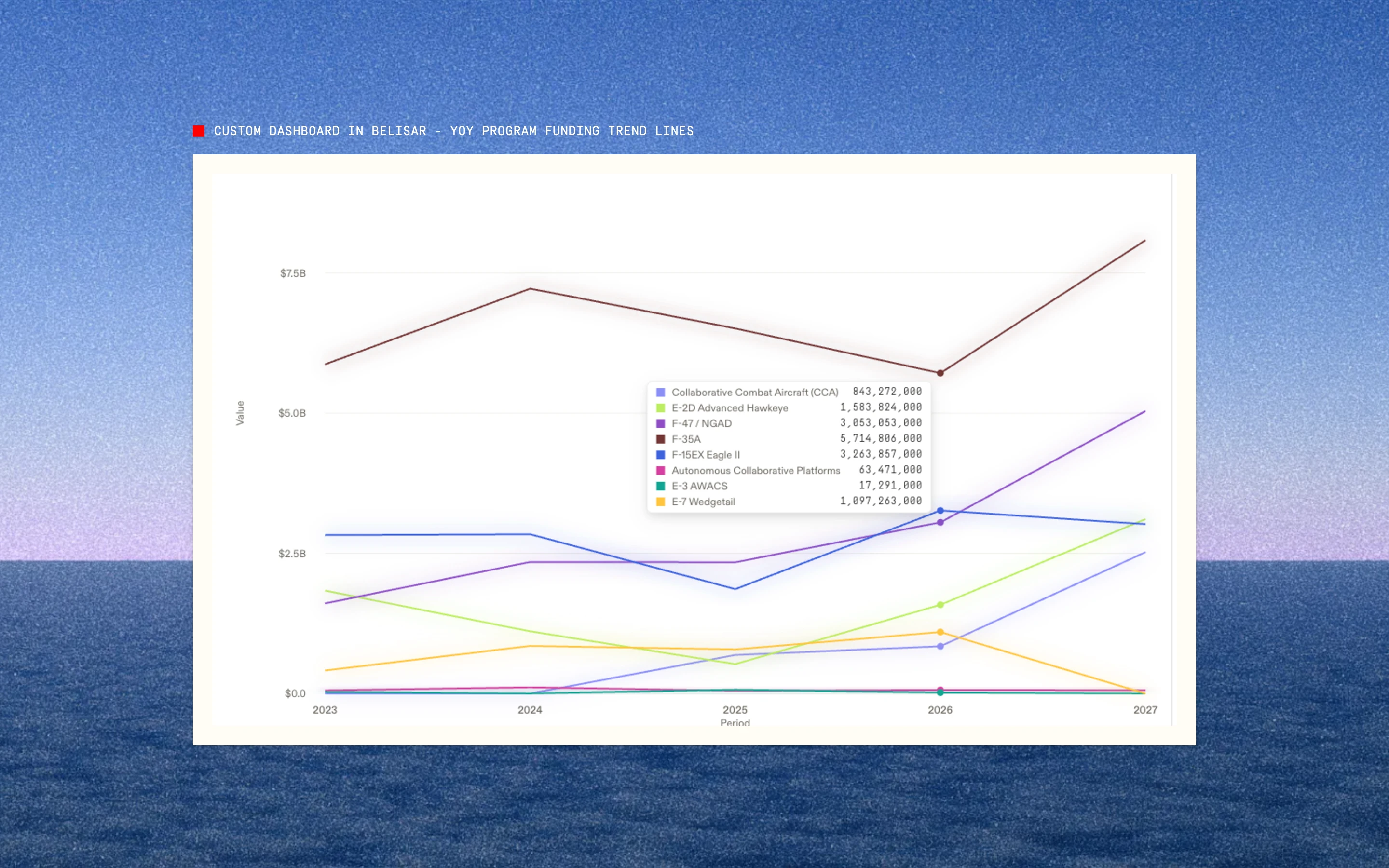
Monitor year-over-year program budget changes.
Belisar can help you track certain programs of interest, and their budgets, over time. Simply ask Belisar to create a tracker or a dashboard to help you see program shifts more clearly.
Track edits from congress.
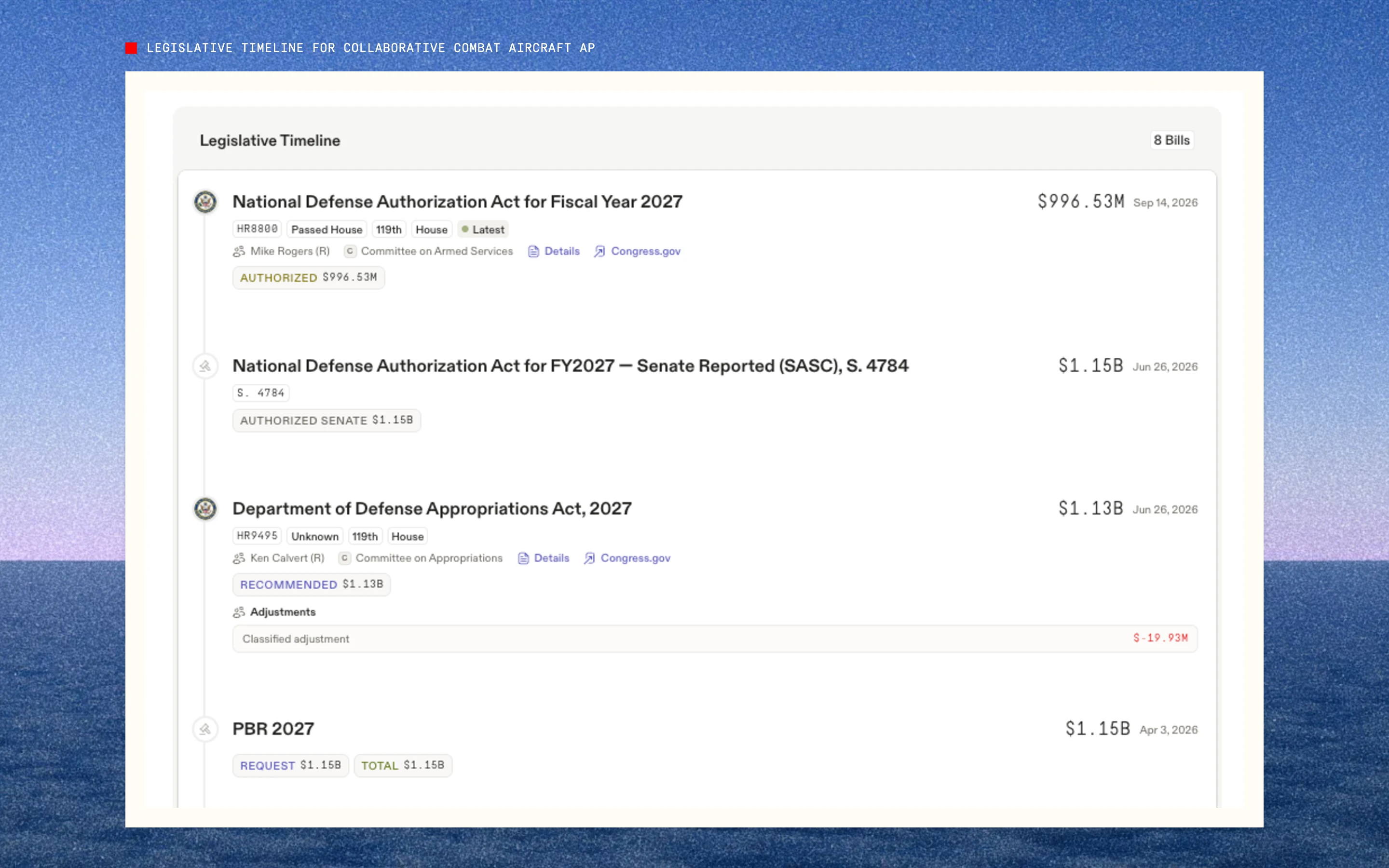
On each program page, Belisar lists the changes that congress makes to program budgets, helping you understand what changed and why.
6. Review and tune the feed based on actual results.
Avoid adding too much noise to your feeds: Review, add parameters, and remove irrelevant keywords to hone the results to exactly what is going to be beneficial to your organization.
7. Got questions? Ask Belisar.
If you’ve set up a feed that starts highlighting solicitations, but you have questions about the ownership, decisionmakers, and broader trends influencing those procurement decisions, just ask Belisar. You can connect the dots and clear the path to a win.
Leave the manual J-Books hunting to Belisar.
If you’ve spent hours scouring 1,000-page J-Books PDFs, searching keywords or programs with Command + F, it’s time to stop scrolling. Step away from the ergonomic mouse. Let Belisar filter out the noise and bring the right opportunities to you.
Want to see Belisar’s capabilities in action? Book a demo with our team, or see Belisar's data to learn more.
J-Book FAQ
What does J-Book stand for?
What does J-Book stand for?
Justification book. Each one justifies a portion of the Department of War's budget request to Congress, line by line. Other federal organizations submit budget justification documents, but J-Books typically refer to the DoW.
What is the difference between an R-1 and an R-2?
What is the difference between an R-1 and an R-2?
The R-1 is the summary list of every RDT&E program element and its funding. The R-2 is the detailed justification for one program element.
What is a P-40?
What is a P-40?
The budget item justification for a single procurement line item: What is being bought, in what quantity, and why.
When are J-Books released?
When are J-Books released?
After the President's budget request, on the Comptroller's budget materials site. Historically, this has ranged from the same week to a few weeks.
Are J-Books public?
Are J-Books public?
Yes, the unclassified J-Books are public. Classified programs appear only as summary lines or not at all.