Automatically Bring GSA eBuy Opportunities Into Belisar

Not every government contracting opportunity is totally public; some require credentials in order to access. GSA eBuy is one of those sources: It sits behind a login, and some of its opportunities include Controlled Unclassified Information (CUI). That access model exists for good reason. It also means part of your pipeline often lives in a separate portal or is scattered across individual inboxes rather than a central repository for your team.
Belisar pulls your team’s GSA eBuy opportunities into the same system as the rest of your capture work.
Turn eBuy Notifications into Opportunities
GSA eBuy sends vendors notifications matched to their contracts and capabilities. Just set up a one-time email feed from GSA eBuy to Belisar, and relevant notifications automatically become opportunities in the platform.
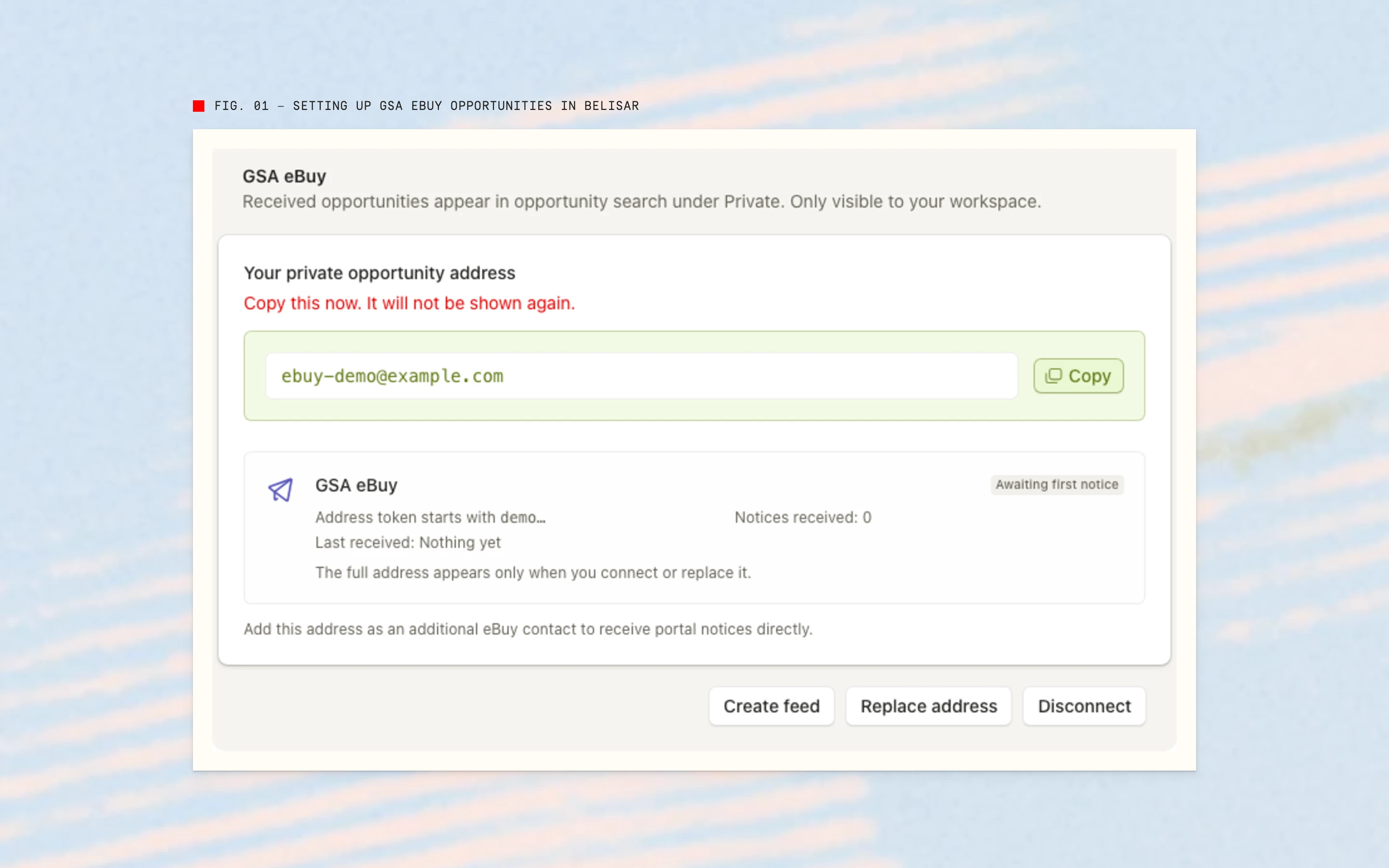
Belisar captures the non-CUI details from each email, including things like:
- Request ID (RFQ, RFI or RFP)
- Status, including amended and cancelled
- Request title
- Buyer, agency and sub-agency
- Contract number
- Release date and quote/bid due date
No one has to manually copy fields from an email into a spreadsheet or CRM. Your team gets a structured view of its GSA eBuy activity that stays updated, even if teammates go out of office or miss an update email.
One Place for Pipeline
Captured eBuy opportunities sit alongside the public procurement data and internal capture activity your team already manages in Belisar.

Set up a dedicated feed to monitor them on their own while keeping them tied to your broader capture workflow. That means fewer handoffs between inboxes, spreadsheets, portals, and CRM records.
Nobody has to ask “Did anyone forward that?” or “Is it in the pipeline?” anymore. Everyone works from the same view that stays automatically updated.
Get Opportunities Already Matched to You
GSA eBuy notifications don’t cover every open opportunity that exists. They’re targeted to the contracts and categories your organization holds.

Connecting them to Belisar keeps that advantage by eliminating the noise. You start with a source that’s already filtered for your business, then organize, segment, and act on it in a shared workspace.
No Need to Share Your eBuy Credentials
Belisar doesn’t store your GSA eBuy credentials or log in to the portal on your behalf.
It captures only the relevant, non-CUI opportunity information delivered to your connected email. Your team gets the signal without extending access to a private portal.
Your organization remains responsible for applying its own security and information-handling policies to connected systems and opportunity content.
See the Field Clearly with Belisar
Federal opportunity data is fragmented by design. Public solicitations, restricted portals, targeted notifications, customer emails, and internal activity each hold part of the picture.
Belisar brings those signals into one system. Capturing GSA eBuy notifications from your inbox cuts manual entry, removes the need for a separate email-based pipeline, and gives your team a fuller view of the opportunities within reach.
Move before the window closes: If you’re already a Belisar customer in our commercial cloud, you can access this capability by following the steps in our platform user guide. This will be released soon for our FedRAMP customers.
If you’re new to Belisar, book a demo with our team today to see how it can transform your federal GTM.
Frequently Asked Questions
What is GSA eBuy?
What is GSA eBuy?
GSA eBuy is the General Services Administration’s online system for requests for quotes (RFQs), requests for information (RFIs), and requests for proposals (RFPs). Federal buyers use it to request quotes from vendors that hold GSA Multiple Award Schedule contracts, governmentwide acquisition contracts (GWACs), and other GSA contract vehicles. It requires a login, and some opportunities include Controlled Unclassified Information (CUI).
How does Belisar capture GSA eBuy opportunities?
How does Belisar capture GSA eBuy opportunities?
Through your email. GSA eBuy sends vendors notifications about new opportunities. When you set up the email feed to Belisar, relevant new notifications will automatically become opportunities in the platform once they hit that email inbox.
What information does Belisar capture from eBuy?
What information does Belisar capture from eBuy?
Non-CUI details from the notification email, including project and opportunity titles, response deadlines, key dates, and other opportunity metadata in the notification.
Does Belisar need my GSA eBuy credentials?
Does Belisar need my GSA eBuy credentials?
No. Belisar doesn’t store your GSA eBuy credentials or log in to the portal on your behalf. It works only from the notifications delivered to your connected email.
Does Belisar capture CUI from GSA eBuy?
Does Belisar capture CUI from GSA eBuy?
No. Belisar captures only the relevant, non-CUI opportunity information in eBuy notification emails. It does not access the platform on your behalf. Your organization remains responsible for applying its own security and information-handling policies to connected systems and opportunity content.
Will I see every opportunity posted on GSA eBuy?
Will I see every opportunity posted on GSA eBuy?
No. You’ll see the opportunities in the notifications your team receives. GSA eBuy targets those notifications to the contracts and categories your organization holds, so you start with a source that’s already filtered for your business.
Can I separate GSA eBuy opportunities from my other opportunities?
Can I separate GSA eBuy opportunities from my other opportunities?
Yes. Set up a dedicated feed to monitor eBuy opportunities on their own. They stay connected to the public procurement data and capture activity your team already manages in Belisar.
Do other companies see my GSA eBuy opportunities?
Do other companies see my GSA eBuy opportunities?
No. Your GSA listings remain yours, in your own workspace. We do not provide those opportunities to other Belisar users.